Respond.io vs Converge


Respond.io is aI-powered omnichannel messaging platform for customer engagement. Best suited for sales-oriented teams needing AI agents, broadcast messaging, and CRM integrations for lead-to-customer conversion. Known for its aI Agents that handle complex conversations, qualify leads, and trigger workflow automations without human intervention.
Messaging-first unified inbox with flat $49/month pricing. Native WhatsApp, Telegram, Messenger, Discord, Zalo, and Instagram support for up to 15 agents.
Respond.io ConvergeMost people comparing respond.io alternatives are not shopping for features. They are trying to make a bill stop moving. Respond.io prices on Monthly Active Contacts rather than seats, and the number that matters is not on the pricing card: $159 is the Growth price at the 1,000-contact tier only. The pricing page carries a contact selector — 1,000 / 2,500 / 5,000 / 10,000 / more than 10,000 — and moving it up reprices the plan itself (respond.io pricing page, checked 22 August 2026). Overage is the second layer on top of that, not the whole story, which is how most comparisons of respond.io get it wrong.
This page is built to answer three questions a feature table cannot: what respond.io actually costs once both of its meters are running, what specifically breaks when you leave, and who should not leave at all. Respond.io is a capable platform and there is a real profile of team that should stay on it — that profile is spelled out at the end rather than buried. Converge appears here as one option among several, at $49/month flat for up to 15 agents with no contact meter.
What features does Respond.io offer?
Respond.io's feature set is intentionally built around what its target customer base values most, which is also its biggest single differentiator against Converge and against other platforms in the same product category. It uses a usage-based pricing model, starting at From $79/mo for the most relevant tier — a fundamentally different cost structure from Converge's $49/month flat rate, which covers up to 15 agents with all channels and AI tooling included. The feature grid below shows the capabilities that matter most when evaluating Respond.io for a unified-inbox use case. The features split across four practical dimensions teams care about: channel coverage (WhatsApp, Telegram, Messenger, Instagram, Discord, Zalo, live chat, email), automation depth (auto-routing, SLA tracking, quick replies, macros, triggers), AI tooling (reply suggestions, message translation), and team management (roles, internal notes, assignment rules, working hours).
How do Respond.io and Converge compare on features?
Respond.io and Converge differ most on messaging-channel breadth and pricing model. Respond.io supports WhatsApp and Telegram natively; Converge has native WhatsApp, Telegram, Messenger, Instagram, Discord, and Zalo and remains the only platform with native Zalo. The comparison below walks through the differences that matter in production.
What exactly counts as a Monthly Active Contact?
A contact who sends or receives a message, or makes or receives a call, during the billing month — and an outbound message that fails to send still counts (respond.io Billing & Usage documentation, checked 22 August 2026). Broadcasts are the single exception. That definition is the part worth pausing on, because it decides your bill. It is not "conversations you had". A contact who ignores you counts. A wrong number counts. A message that bounces counts. The meter resets at the start of each billing cycle, so a one-off list-cleaning push lands entirely in one month.
This is why the honest test before you switch is not a feature audit. Open Billing & Usage, click Details under MAC, and read your last three billing periods. If your contact count is flat, respond.io's model is working for you and the rest of this page is academic. If it steps up every month, you are on a meter that rewards a quiet business — and no alternative will fix that if the thing driving it is genuine growth in people you need to reach.
The second meter most comparisons miss
AI Credits are a full second usage meter, and they are the one teams do not see coming. Every AI action draws from a monthly pool: AI Assist, AI Translate and chat summaries cost 1 credit each, an AI Agent response costs 2–5 credits, call transcription runs ~2 credits per minute, and a Voice AI Agent burns roughly 70 credits per minute (respond.io AI Credits documentation, checked 22 August 2026). The allowance scales with your contact tier — 10x on Growth, 20x on Advanced, 40x on Enterprise — so Growth at 1,000 contacts gets 10,000 credits.
Run the voice arithmetic before trusting the "AI is included" headline: at ~70 credits per minute, a Growth plan's entire 10,000-credit monthly allowance is roughly two and a half hours of Voice AI Agent time. Past that, on-demand bills automatically at $15 per 1,000 credits, rounded up per block — exceed by a single credit and you are charged the full $15. There is a hard cap at 200% of the allowance, which is genuinely a consumer protection: the worst case on a 10,000-credit plan is $150, then AI pauses until the cycle resets. Text-only AI use rarely troubles the pool. Voice is a different product with a different cost shape wearing the same "included" label.
Which channels does respond.io actually cover?
Respond.io has the broader channel catalog: WhatsApp, Telegram, LINE, WeChat, Viber, Instagram, Messenger, TikTok, SMS via Twilio/MessageBird/Vonage, plus HubSpot and Salesforce panels, Zapier, Make, n8n and a Developer API on Growth and above. Flat-rate support inboxes generally do not match that breadth — no LINE, no WeChat, no Viber, no native CRM sidebar. The two channels respond.io does not support at any tier are Discord and Zalo, which is a genuine gap for gaming and developer communities and for teams selling into Vietnam, and irrelevant to everyone else. If your customers are on LINE or WeChat, respond.io is simply the correct tool and switching would cost you a channel.
How much does Respond.io cost vs Converge?
Respond.io starts at From $79/mo on a usage-based model. Converge is $49/month flat for up to 15 agents — a 5-agent team would pay $795/month on Respond.io versus $49/month on Converge. Starting prices rarely tell the full cost story; the breakdown below calls out hidden costs and paid add-ons that often surprise teams.
Respond.io pricing at the 1,000-contact tier, annual billing (monthly billing runs ~25% higher — $99/$199/$349), verified against respond.io's pricing page on 22 August 2026:
- Starter: $79/month — 5 seats, unlimited monthly active contacts, a fixed 5,000 AI Credits, but no workflows, no broadcasts, no AI Agents, no Developer API
- Growth: $159/month — 10 seats, 1,000 contacts, AI Credits at 10x the contact tier, adds workflows, broadcasts, AI Agents, Zapier/Make/n8n and the Developer API
- Advanced: $279/month — 10 seats, 1,000 contacts, AI Credits at 20x, multiple workspaces, custom channels, SSO, webhooks, phone/email masking
- Enterprise: custom — unlimited users, higher workspace and API rate limits
Read those four numbers as floors, not prices. The contact selector at the top of the pricing page reprices every self-serve plan as you move up through 2,500, 5,000 and 10,000 contacts; the $79/$159/$279 figures are what the page displays at the lowest setting. Any comparison that quotes "$159/month" without naming the contact tier — including, previously, this page — is quoting a floor.
Two changes worth flagging if you priced respond.io earlier in 2026. Advanced no longer offers self-serve signup: Starter and Growth show "Start Free Trial", while Advanced and Enterprise show "Talk to Sales", so the top self-serve tier is now sales-gated. And the trial has a failure mode that is easy to miss — it ends early if you hit 100% of its MAC limit (respond.io Billing & Usage documentation, 22 August 2026), so a team that stress-tests the platform with a contact import can end its own evaluation in two days.
Overage sits on top of the tier price: $12 per 100 contacts on Growth, $15 per 100 on Advanced, billed at cycle end. Extra seats are +$12 (Starter), +$20 (Growth), +$24 (Advanced) each per month. Respond.io's own documentation calls on-demand "intended for temporary, seasonal usage spikes" and says a permanent increase should be a tier upgrade — so persistent overage means you are on the wrong tier, not getting a bargain. Meta's WhatsApp conversation fees apply on top of all of it, at no respond.io markup.
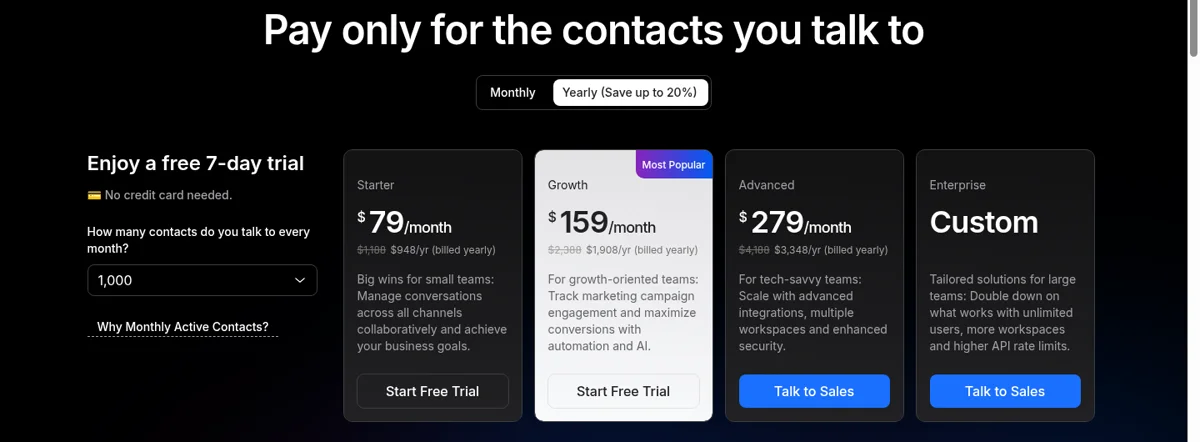
Two-panel screenshot of respond.io's pricing page contact selector, captured 2026-08-22, evidencing that the advertised price is a floor. Left panel: selector set to 1,000 contacts showing Starter $79 / Growth $159 / Advanced $279. Right panel: same page with the selector moved to 5,000 contacts, showing the repriced plan cards. Keep both panels at identical viewport width and crop to the plan-card row plus the selector control so the price delta is the only visible difference.
Does respond.io work out cheaper than a flat-rate inbox?
It depends entirely on whether your contact count is stable, and the crossover is worth calculating rather than assuming. Respond.io bills on contacts; a flat-rate inbox like Converge bills $49/month for up to 15 agents with no contact meter. A team with 12 agents and a small, steady contact base can genuinely land close on price, and if that team needs LINE, broadcasts or the workflow builder, respond.io is the better buy outright — those are real capabilities a support-focused inbox does not have.
The gap opens on two specific shapes. First, seat-heavy teams: respond.io's included 10 seats on Growth means agents 11 through 15 cost +$20/month each, so a 15-agent team adds $100/month on top of the tier price, while the same headcount sits inside a flat rate. Second, growing contact volume, where the tier price and the overage line move together in the same direction. What a flat rate buys is not always a lower number — it is a number that does not change when a campaign works. That predictability is worth most to teams whose contact count is climbing, and worth nearly nothing to teams whose contact count is flat.
What are Respond.io's strengths and limitations?
Respond.io's biggest strengths cluster around what reviewers consistently single out as its standout capability, which is what makes it a strong fit for its target customer base. Its limitations cluster around pricing-model fit at smaller team sizes and around channel-coverage gaps relative to a messaging-first inbox like Converge, which is $49/month flat for up to 15 agents with all channels and AI tooling included. The detailed strength and limitation lists below come from aggregated G2 and Capterra reviews plus our own internal customer-pipeline reports — teams that actively use Respond.io today as their primary support inbox, as well as teams that have already left it for a different platform. Read them carefully and pay particular attention to limitations that intersect with the workflow pain points your own team is already hitting day-to-day, because those specific intersection points are the issues that most often justify a full migration rather than a different fix.
Strengths
- Powerful AI Agents for automated customer conversations
- Visual workflow automation builder with conditional logic
- Strong broadcast messaging for marketing campaigns
- Good CRM integrations (HubSpot, Salesforce, Zapier, Make)
Limitations
- Two usage meters run at once — Monthly Active Contacts and AI Credits — and both climb with engagement
- The advertised $159 Growth price is the 1,000-contact tier only; the plan reprices as you move up the contact selector
- A failed outbound message still burns a Monthly Active Contact
- WhatsApp per-conversation fees add to base cost
When is Converge the better fit than Respond.io?
Converge is the better fit than Respond.io in three specific scenarios that come up consistently in our customer-pipeline data. First: when your support team is under 15 agents total and you want flat $49/month pricing instead of per-seat costs that scale linearly with headcount. Second: when your customers primarily reach you on messaging channels like WhatsApp, Telegram, Messenger, Discord, or Zalo rather than email or web tickets — Converge has native support for all of these out of the box, including the only native Zalo integration on the market. Third: when you want AI reply suggestions and message translation included as part of the base subscription rather than gated behind a premium upgrade tier or sold as a paid add-on. The verdict grid below walks through each scenario in more practical detail with concrete examples.
If your team primarily uses messaging channels and wants predictable pricing without per-seat costs, Converge is worth considering.
Why teams choose Converge
- $49/month for your whole company (up to 15 agents)
- Native WhatsApp, Telegram, Messenger, Discord, Zalo
- Unified inbox for real-time conversations
- AI reply suggestions and message translation included
When to choose Respond.io
- Enterprise compliance (HIPAA, SOC2)
- Email/ticket-heavy workflows
- Advanced automation requirements
- Teams larger than 15 agents
Respond.io or Converge: which should you pick?
Pick Respond.io if your team's primary need maps to its standout capability, and its per-seat pricing model works at your projected team size. Pick Converge if you're a 3-15 agent team handling messaging channels (WhatsApp, Telegram, Messenger, Instagram, Discord, Zalo) and want flat-rate pricing instead of per-seat costs that scale with headcount. Converge is $49/month flat for up to 15 agents, with all messaging channels and AI tooling included — no premium gating, no paid add-ons.
Choose Respond.io if you need WeChat, LINE, or Viber support alongside WhatsApp and Telegram — these are channels Converge doesn't cover. Respond.io's contact-based pricing also suits teams with many agents but relatively few active contacts, where per-seat pricing would be more expensive. The platform's Asian messaging channel coverage (LINE, WeChat, Viber) is particularly strong.
Choose Converge if you want predictable flat pricing regardless of contact volume, need Discord or Zalo support, or your contact volume is high enough that respond.io's contact-based pricing becomes expensive. Converge at $49/month has no contact limits.
How hard is it to switch from respond.io to Converge?
The switch is a half-day job for most small teams, with one channel that needs care: WhatsApp. Respond.io connects WhatsApp as a Business Solution Provider, so your number is registered to its WhatsApp Business Account. Moving it means disabling two-factor authentication, disconnecting the channel in respond.io, then re-registering the same number through your new platform's Meta OAuth flow — your verified business name and approved templates carry over via Meta, but there is a short routing gap where inbound WhatsApp messages reach neither inbox, so cut over during your quietest hour. Telegram is instant (reuse the same BotFather bot token), and Messenger plus Instagram reconnect through Meta OAuth in two to three minutes each. Export your contacts and the last 12 months of messages from respond.io first, under Workspace SettingsData settingsData Export; each export request caps at one year of history, runs one job at a time, and the download link expires after seven days. Discord and Zalo need no migration at all — respond.io never supported them, so they are net-new coverage once you are on Converge.
When should you choose Respond.io or Converge?
What actually breaks when you leave respond.io
Export first, and know its limits before you plan the switch. Under Workspace SettingsData settingsData export (Owners and Managers only) you can pull Contacts, Conversations, Messages and Failed Messages. Three constraints shape the timeline: each request covers a maximum 365-day range, only one export job runs at a time per workspace, and the finished file expires after 7 days. A job running past 15 minutes is dismissed, with a 30-minute cooldown before you retry. Multi-year history therefore means several sequential requests, not one — start the exports before you give notice, not after.
Two details bite people. Conversation exports are selected by open time, not resolution time, so a thread opened in December and resolved in January lands in the December file — date-bounded exports will look like they are missing data when they are not. And respond.io prepends an apostrophe before =, +, -, @, tabs, semicolons and pipes as formula-injection protection; those markers must be stripped before the CSV loads cleanly anywhere else (respond.io Data Export documentation, 22 August 2026).
What does not come out at all: workflow automations, AI Agent configurations, broadcast templates, Growth Widget settings and custom channel setups. There is no export for any of them. Screenshot your workflow canvas and copy your AI Agent guidance text by hand before you cancel, because a canceled organization is flagged for deletion after 30 days and incoming messages stop being stored during cancellation. WhatsApp is the one channel with real switching cost: your number is registered to respond.io as its Business Solution Provider, so moving it means disabling 2FA, disconnecting, and re-registering through the new platform — verified name and approved templates carry over via Meta, but there is a short window where inbound messages reach neither inbox. Cut over at your quietest hour. Telegram is instant with the same BotFather token; Messenger and Instagram are a two-minute Meta OAuth each.
Who should stay on respond.io
Stay if any of these is true. Your customers are on LINE, WeChat or Viber — no flat-rate messaging inbox covers these, and switching costs you the channel outright. You depend on WhatsApp broadcast campaigns, which is a marketing capability support-focused inboxes deliberately do not include. Your automation genuinely needs branching logic that purpose-built auto-reply and routing rules cannot express. Or you checked Billing & Usage and your contact count has been flat for three cycles, in which case the meter is not costing you anything and a migration would be work without payoff.
Look at alternatives if your MAC graph steps up every month, if you are paying for seats 11+ on top of a tier that already reprices with growth, if you need Discord or Zalo, or if your use is support rather than outbound sales — respond.io's centre of gravity is lead conversion, and a team using it purely as a support inbox is paying for a sales engine it never runs. Converge fits the narrow case: 3–15 agent support teams on WhatsApp, Telegram, Instagram, Messenger, Discord or Zalo who want the bill to stop moving, at $49/month flat for up to 15 agents. It is not the right answer for LINE, for broadcasts, or for enterprise compliance requirements.
Want to explore more? Browse all 750+ platform comparisons, see all Respond.io comparisons, or check Respond.io alternatives.
Frequently Asked Questions
Respond.io is Sales-oriented teams needing AI agents, broadcast messaging, and CRM integrations for lead-to-customer conversion. Converge focuses on messaging-first customer support with native WhatsApp, Telegram, Messenger, Instagram, Discord, and Zalo integration. Respond.io uses per-seat pricing starting at From $79/mo, while Converge offers flat $49/month pricing for up to 15 agents.
Converge is typically cheaper for teams. Respond.io starts at From $79/mo per agent, so a 5-person team costs approximately $795/month. Converge is $49/month flat for up to 15 agents, regardless of team size.
Converge has native support for WhatsApp, Telegram, Messenger, Instagram, Discord, and Zalo. Respond.io supports WhatsApp and supports Telegram. Converge is the only platform with native Zalo integration.
Respond.io's strengths include: Powerful AI Agents for automated customer conversations; Visual workflow automation builder with conditional logic; Strong broadcast messaging for marketing campaigns. Weaknesses include: Two usage meters run at once — Monthly Active Contacts and AI Credits — and both climb with engagement; The advertised $159 Growth price is the 1,000-contact tier only; the plan reprices as you move up the contact selector; A failed outbound message still burns a Monthly Active Contact.
Choose Respond.io if you need Sales-oriented teams needing AI agents, broadcast messaging, and CRM integrations for lead-to-customer conversion. Choose Converge if you primarily use messaging channels (WhatsApp, Telegram, etc.) and want predictable flat-rate pricing without per-seat costs. Converge is ideal for SMBs and messaging-first teams.
Ready to try Converge?
$49/month flat. Up to 15 agents. 7-day free trial, no credit card required.
Start Free Trial